The complete guide

Google Business Profile for contractors — how to set it up, run it, and actually get into the map.

A Google Business Profile for contractors is the free Google listing that decides whether you show up when a homeowner searches "roofer near me" or "plumber Carlsbad." This guide covers the whole thing: how to create one, who is eligible, the levers that move the local 3-pack (categories, services, reviews, photos, posts, NAP), how Google's relevance, distance, and prominence actually rank you, the mistakes that quietly cost calls, and exactly what Roscoe Site Pro does every month.

The short answer

A Google Business Profile is the highest-value free lead source most contractors have — it feeds the local 3-pack where "near me" searches turn into calls. You can run it yourself for free (the only cost is doing the monthly work between jobs), or have Roscoe Site Pro run it as Maps Growth at $999/month, month-to-month, with a monthly proof report and no rank promise. DIY if you have the hours and discipline; hand it off if you'd rather the calls keep coming while you're on the truck.

Last updated July 6, 2026 · by Joshua Lyman, active-duty Navy operator
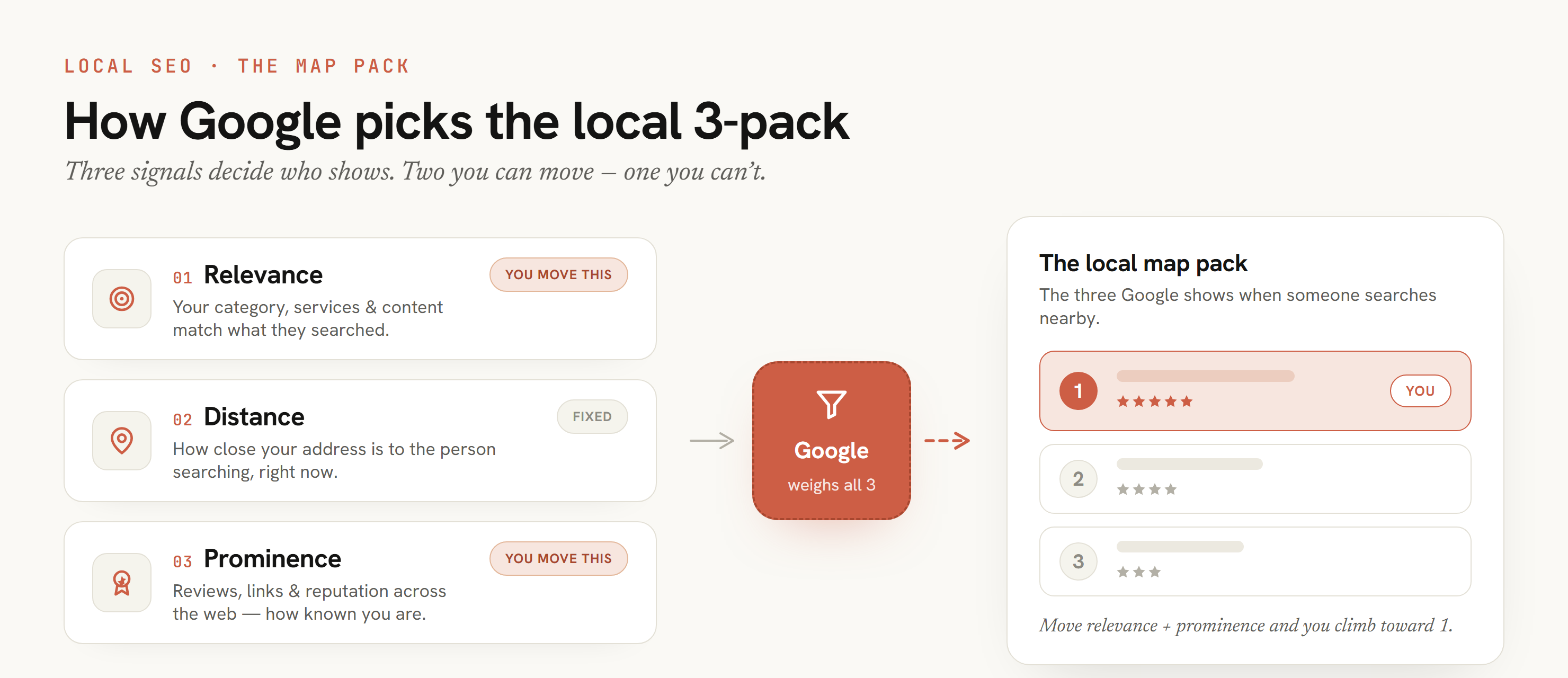
Diagram of how Google picks the local 3-pack for contractors: three ranking signals — relevance, distance, and prominence — feed Google, which decides the three businesses shown in the map pack. Relevance and prominence are signals a contractor can move; distance is fixed.
How the local 3-pack ranks: relevance and prominence are the levers you can move, distance is fixed.
The direct answer

What is a Google Business Profile for contractors?

A Google Business Profile is the free business listing a contractor shows on Google Search and Google Maps — the name, categories, services, service area, hours, phone, photos, reviews, and Q&A a homeowner sees when they search for a roofer, plumber, electrician, or tree service near them. It is the listing that feeds Google's local map results, and for most contractors it drives more direct calls than the website alone. Optimizing it (sometimes called Google Business Profile management, or the old "Google My Business") is the ongoing work of keeping that listing complete, accurate, and trusted so it surfaces for the searches that turn into jobs. Google rewards profiles that stay active and consistent over time, which is why the real work is a monthly loop, not a one-time checkbox.

It is the highest-value free lead source.

For most contractors, the Google profile drives more direct calls than the website alone. Searches like "roofer near me" and "plumber Carlsbad" lean heavily on the local pack: categories, reviews, proximity, and proof.

It is maintenance, not one-and-done.

A profile set up once and forgotten slowly loses ground. Photos, posts, reviews, and accurate info have to be refreshed for the listing to keep working.

It is signals you control.

You cannot control Google's algorithm, but you can control categories, services, photos, posts, reviews, Q&A, and NAP consistency — and those are exactly what optimization works on.

Where this fits

Where the profile sits in the RSP Trust Path.

Every RSP offer fixes one stage of the same system — the RSP Trust Path: get found → get trusted → get the call → follow up. The Google Business Profile is the engine of the get found stage: it decides whether you appear in the Maps pack at all, and it is the core of the monthly work in local SEO for contractors. A contractor website that wins trust turns that visibility into calls, and Roscoe LeadOS lead follow-up keeps those calls from going cold. Not sure the profile is even your leak? The free Contractor Lead Leak Map traces the path from Google to the booked job and shows which stage is actually losing you work — before you spend a dollar.

Getting started

Setting up a Google Business Profile: free, no LLC needed, open to any real contractor.

Before optimization comes setup, and the setup questions trip up more contractors than the algorithm does. The short version: the profile is free, you do not need an LLC, and any real, operating contractor who makes contact with customers is eligible. Here are the four questions almost everyone asks first.

Is a Google Business Profile free?

Yes — completely. Creating, verifying, and managing it is free, and so are posts, photos, reviews, Q&A, messaging, and insights. The only cost is your time, or paying someone to run it. Google Ads is a separate paid product and is not required to have or rank a profile.

Do I need an LLC?

No. A sole proprietor under their own name or a DBA can create one. Google requires that the business be real, that you make in-person contact with customers, and that you can verify it — not a specific legal structure. An LLC is a tax and liability decision, not a Google requirement.

Who is eligible?

Any business that contacts customers during its hours. Contractors who travel to the job register as a service-area business and list the cities they serve instead of a storefront. You must be the true owner or an authorized rep, and the business must be open and verifiable. Brand-new contractors qualify as soon as they are operating.

How do I create one for my contracting company?

Go to google.com/business (or search your business name and choose "Add your business"), sign in with the Google account that should own the listing, and enter your exact business name. Pick the most accurate primary category, then choose service-area and list the cities you cover. Add your phone and website, then verify by phone, video, or postcard. Once verified, complete every field, add real photos, list all services, and start asking for reviews. Verification can take a few days; the profile improves from the day you finish it.

One account, one source of truth

Use the exact legal or DBA name the business operates under, and the same name, address, and phone you use on your website and directories. Consistency from day one saves you from the NAP cleanup that slows most profiles down later.

The real levers

How do I optimize a Google Business Profile for contractors?

These are the levers that actually move a contractor profile, in roughly the order that matters. There is no secret trick — there is a checklist, worked consistently. Skip the "hacks" that risk a suspension and do the boring things well.

1. Categories

Set the single most accurate primary category, then add relevant secondary ones. The primary category is one of the strongest relevance signals for what you show up for. Vague or wrong categories quietly cap your visibility.

2. Services

List every real service with clear names and short descriptions. This tells Google, and customers, exactly what you do, and feeds the searches you can show up for.

3. Service area

Set a realistic service area that matches where you actually work. Honest boundaries beat padding the map with cities you do not serve, which can hurt trust and risk the profile.

4. Photos cadence

Add real photos of jobs, trucks, crew, and finished work on a regular cadence — not a one-time dump of stock images. Fresh, real photos signal an active, legitimate business.

5. Weekly posts

Use Google posts to keep the profile active: recent jobs, seasonal reminders, offers, FAQs. A profile that posts regularly looks alive; a silent one looks abandoned.

6. Reviews

Ask every happy customer for a review, reply to all of them (good and bad), and keep the velocity steady. Review count, rating, recency, and responses are some of the loudest trust signals you have.

7. Q&A

Seed and answer the common questions on your profile before a competitor or a bot answers them wrong. The Q&A section is public and rarely managed, so owning it is easy, high-trust work.

8. NAP consistency

Make your business name, address, and phone match exactly across your website, the profile, and directories. Inconsistent NAP confuses Google and erodes the trust the rest of the work builds.

9. Profile completeness

Hours, attributes, description, booking links, and every field filled in. Completeness is the cheapest win on the list, and the one most contractors leave half-done.

How the map ranks

How the local 3-pack works: relevance, distance, and prominence.

The "3-pack" is the block of three businesses with a map that Google shows at the top of a local search like "plumber near me" or "roofer Carlsbad." It is where most contractor calls are won or lost. Google publishes how it ranks those three, and there is no secret — results are ordered by relevance, distance, and prominence. You cannot buy a spot or force one, but every lever above maps directly to one of these three signals. Anyone promising a guaranteed 3-pack position is selling something Google does not allow.

SignalWhat Google means by itWhat a contractor does about it
RelevanceHow well the profile matches what the person searched.Set the right primary category, list every real service, write an accurate description, and back it with website pages that answer the exact search.
DistanceHow far the business is from the searcher or the place they searched.Set an honest address and service area. You cannot fake location — a profile may show for one neighborhood and vanish a few miles away — but you can make sure Google reads your location correctly.
ProminenceHow well-known and trusted the business is, online and off.Build review count, rating, and recency; keep citations and NAP consistent; add real photos and proof — steadily, never gamed.

This is why a single screenshot never tells the whole story: distance changes with every searcher, so two homeowners on opposite sides of town see different results. The honest goal is not a fixed rank — it is to be more relevant, unmistakably located, and more prominent than the contractor next to you. For the deeper play on why this often beats spending more on ads, see Maps Growth vs more ads for contractors.

Avoid these

Common contractor Google Business Profile mistakes — and the fix.

Most contractor profiles are not penalized; they are just half-finished or quietly working against themselves. These are the mistakes that cost calls most often, in the order worth checking, with the fix for each.

Wrong or too-broad primary category

"Contractor" when you are a roofer caps your relevance for the searches you should win. Fix: set the single most accurate primary category, then add real secondary ones.

Stuffing the business name with keywords

Adding "Best Carlsbad Roofing" to your name violates Google's guidelines and risks suspension. Fix: use your real business name only; earn the keywords through category, services, and reviews.

Padding the service area

Listing 40 cities you do not really serve hurts trust and relevance. Fix: list only the cities you actually work, which also keeps you honest in the local pack.

Going silent after setup

A profile set up once and forgotten slowly loses ground to active competitors. Fix: post regularly, refresh photos, and keep the review velocity steady — the profile only works if someone runs it.

Ignoring reviews (and replies)

Few reviews, stale reviews, or unanswered ones — good and bad — read as a quiet business. Fix: ask every happy customer, and reply to all of them; recency and responses are loud trust signals.

Inconsistent or mismatched NAP

A name, address, or phone that differs between the profile, website, and directories confuses Google. Fix: make all three match exactly, everywhere they appear.

Stock photos and an empty profile

Stock images and blank fields signal a profile no one tends. Fix: add real photos of jobs, trucks, and crew on a cadence, and complete every field.

Chasing "guaranteed #1" services

Anyone promising a guaranteed top spot is selling a promise Google does not allow — and some use fake reviews or doorway pages that risk your profile. Fix: pay for the work and proof of what changed, not a position.

No website pages backing the profile

A strong profile with a weak or missing website leaves relevance and trust on the table. Fix: back it with real service and local pages — see contractor websites and local SEO for contractors.

The decision

Do it yourself, or have RSP run your Google Business Profile?

Every lever on this page is owner-doable — nothing here is locked behind an agency. The honest question is not "can I do this," it is "will I do it every month, on cadence, between jobs." Here is the straight comparison so you can pick.

Do it yourself

Free — plus your time
  • Set categories, services, and an honest service area
  • Add real photos and post on a regular cadence
  • Ask for reviews and reply to every one
  • Seed and answer Q&A; keep NAP consistent everywhere
  • Re-check it every single month so it doesn't go quiet
Make this call if you have the hours, the discipline to keep it up month after month, and you'd rather spend money elsewhere. The profile is genuinely free; the cost is consistency.

Have RSP run it — Maps Growth

$999/month · month-to-month · no contract
  • RSP works the nine levers every month, in priority order
  • Competitor visibility snapshot + suspension-risk check
  • Review and trust support; post and photo-request drafts
  • Light website + proof support so site and profile reinforce
  • A monthly proof report: what changed, what moved, what's next
Make this call if your calendar is full and you'd rather the work just happen. You pay for the work and the proof of what changed — never a guaranteed ranking.

Not sure the profile is even your bottleneck? A weak or missing website caps the same searches — that's Site Launch ($499 build + $79/mo). Losing the calls you already get to slow follow-up is a different problem — that's Roscoe LeadOS. Maps Growth is the right first move when the work is good but the map isn't sending the calls. Send your site and profile and RSP will tell you which one to fix first — or see all three contractor lead offers compared side by side.

Proof, not a promise

What this looks like on a real North County profile.

RSP is deliberately small and won't fabricate results. Here is the one real, named client RSP can point to — demonstrated, not asserted.

25 yrs
In business
97
5-star Google reviews
5.0
Average rating
48 hr
Preview to launch

Artistic Solutions Tree Service — San Marcos, CSLB #906384.

Twenty-five years of five-star work and 97 reviews at 5.0 were buried behind a dated site under a legacy brand — the strongest proof Daniel owned wasn't even on the homepage. RSP rebuilt the site in 48 hours: phone above the fold, service area mapped to the North County cities he actually drives, reviews and license badged up front, real crew photos in place of stock. The work was always there; the website finally carries it.

See the full before/after case study
What RSP does monthly

Maps Growth is the operator that runs these levers every month — at $999/month.

Optimization is not a project that ends. Roscoe Site Pro runs Maps Growth as a monthly system: measure where you show up, compare you against the contractors beating you, fix the profile, site, and proof gaps we can control, and show you exactly what changed. One single tier, month-to-month, no contract.

  • Local visibility scan plus a competitor visibility snapshot.
  • GBP relevance audit: categories, services, service areas, hours, photos, Q&A, completeness, and suspension-risk notes.
  • Review and trust check: count, rating, recency, velocity, response status, and safe review-request support.
  • A real photo and proof request list, plus post and update drafts when useful.
  • Light website support: title, meta, H1, internal links, proof blocks, and CTAs when access allows.
  • A monthly proof report: what we checked, what changed, what moved, what is blocked, and the next three actions.

What the monthly loop produces.

RSP does not sell a ranking. It sells a measured loop: data, a diagnosis, a shipped fix, proof of the change, and the next move. Here is what a Maps Growth month is built to produce, and what it never includes.

Week 1: baseline

Scan the profile, website, service areas, reviews, and competitor visibility, then name the top local-trust leaks worth fixing first.

Week 2: profile work

Clean categories, services, descriptions, photos, review responses, and Q&A — the levers above, worked in priority order.

Week 3: site support

Strengthen service and local pages, internal links, proof blocks, and the call path so the profile and website reinforce each other.

Week 4: proof report

Show exactly what was checked, what changed, what proof was added, what moved, what did not move yet, and the next 30-day plan. Real proof, plainly written, never raw dashboards pretending to be strategy.

What we never sell

No guaranteed top ranking, no fake reviews, no name stuffing, no doorway city pages, and no "AI-search placement" promises.

What a report looks like

An example Maps Growth monthly work log.

To make "the work" concrete, here is an illustrative example of what a single month's profile work log can look like — the format RSP delivers, not a specific client's results. It is a sample layout, shown so you know what you would receive; it is not a guarantee or a claim about any contractor's numbers. The point is that every line is a thing that was checked or changed, in plain language.

AreaWhat was checked / done this monthStatus
CategoriesConfirmed primary category; added one accurate secondary category.Done
ServicesAdded the missing services with short descriptions to match how homeowners search.Done
PhotosUploaded new real job/crew photos; requested more from the owner for next month.Done / ongoing
ReviewsSent the month's review requests; replied to all new reviews; flagged any needing a response.Done
PostsPublished Google posts (recent jobs, seasonal reminder).Done
Q&ASeeded and answered common questions before they were answered wrong.Done
NAPAudited name, address, phone across the site and directories; corrected mismatches.Done
Website supportStrengthened one priority page's title, H1, internal links, and call path (when access allows).Done / blocked on access
Next 30 daysTop three actions for next month, prioritized.Planned

Your real report carries the actual counts for each line and a short note on what moved and what is still blocked. The one real, named result RSP can point to is the Artistic Solutions Tree Service case study: 25 years of five-star work and 97 reviews at 5.0, rebuilt into a modern site in 48 hours. Everything else on this page is method, not a promised number.

Optimization vs management

Optimization gets it right. Management keeps it right.

The two terms get used interchangeably, but they are different jobs. Optimization fixes the profile once; management keeps it optimized so it does not slide back. Maps Growth does both, in one monthly system.

QuestionProfile optimization (the fix)Profile management (the upkeep)
What it isOne pass to fix categories, services, photos, reviews, completeness, and NAP.Keeping all of it fresh: weekly posts, new reviews and replies, refreshed photos, monitored Q&A.
When it helpsWhen the profile is incomplete, miscategorized, or inconsistent today.When the profile is solid but goes quiet without someone running it.
Main risk if skippedYou stay invisible for searches you should win.You optimize once, then slowly lose ground to active competitors.
How RSP handles itThe Week 1-2 profile work in every Maps Growth month.The ongoing monthly loop: posts, reviews, photos, Q&A, reporting.
What it costs

How much does Google Business Profile optimization cost?

It depends entirely on whether you do the monthly work yourself or hire someone to run it. The profile is free; the cost is time or money. Here is the honest range — including what other providers publicly charge — so you can judge any quote against it.

Do it yourself

Free, plus your time. Every lever above is owner-doable. The real cost is remembering to work it every month between jobs — which is exactly where most profiles go quiet.

Hire it out

Managed profile and local-SEO services vary widely — from a few hundred dollars to well over a thousand a month. Some list it openly: BrightLocal, for example, publicly prices fully managed local SEO at $1,299/month.

RSP Maps Growth

$999/month, month-to-month, no contract. One tier. It bundles the profile work with light website and proof support and a monthly report — not a one-time setup you maintain alone.

How to read the price

The fair comparison is not against zero — it is against what you already spend renting attention. Shared lead marketplaces often charge as much or more for a single click you never own, sometimes sold to three competitors at once. A managed profile sends the call straight to you and keeps working after the month ends.

The red flag

Anyone guaranteeing a #1 Maps spot for a price is selling a promise no one can keep. You pay for the work and the proof of what changed — never a guaranteed position.

Before you decide

Hiring RSP for your profile — the buyer questions.

The decision questions a contractor actually asks before handing off the profile: what it costs, how long it takes, what RSP needs from you, and when it's worth it.

What does it cost to have RSP run my Google Business Profile?

Maps Growth is $999/month, month-to-month, with no contract — one public tier. That bundles the monthly profile work (the nine levers), a competitor visibility snapshot, review and proof support, light website support, and a monthly proof report. There's no setup fee for Maps Growth itself. For comparison, some providers publicly list more — BrightLocal prices fully managed local SEO at $1,299/month. If RSP also builds your website, that's Site Launch ($499 build + $79/month hosting), and the build is waived to $0 when bundled with Maps Growth.

How long until I see anything change?

The profile starts improving the week the work starts — categories, services, photos, and review responses are fixed in the first month. But Google Maps movement is not instant and no one can honestly promise a date or a position; local results shift with proximity, reviews, relevance, and competitors. What you get every month is a proof report of exactly what was checked, changed, and what moved — you're paying for the work and the evidence, not a guaranteed ranking by a deadline.

What do you need from me to get started?

Owner or manager access to the Google Business Profile, your real business name, address, and phone (so RSP can fix NAP everywhere), a few real photos of jobs, trucks, and crew to start, and a quick list of the cities you actually serve and the services you offer. That's it to begin — RSP handles the rest and asks for fresh photos and review nudges each month.

When does Maps Growth make sense — and when does it not?

It makes sense when your work is good but the map isn't sending calls: an incomplete, miscategorized, or quiet profile, thin reviews, or competitors outranking you locally. It's not the first move if you have no website at all (start with Site Launch) or if you're already getting plenty of calls but losing them to slow follow-up (that's Roscoe LeadOS). Send your site and profile and RSP will tell you honestly which one to fix first.

Do you guarantee I'll rank #1 on Google Maps?

No — and anyone who does is selling a promise Google doesn't allow. RSP improves the signals you control (categories, services, reviews, photos, posts, Q&A, NAP, website relevance) and measures it by completed fixes and what moved. No fake reviews, no name stuffing, no doorway pages, no "AI-search placement" claims. You pay for the work and the proof, not a position.

FAQ

Google Business Profile for contractors — straight answers.

What is a Google Business Profile for contractors?

It is the free business listing a contractor shows on Google Search and Google Maps — name, categories, services, service area, hours, phone, photos, reviews, and Q&A. It feeds the local map results (the 3-pack) where "near me" searches turn into calls, and for most contractors it drives more direct calls than the website alone. Optimizing it is the ongoing work of keeping it complete, accurate, and trusted. It is maintenance, not a one-time setup.

Is a Google Business Profile free?

Yes — completely. Creating, verifying, and managing it is free, and so are posts, photos, reviews, Q&A, messaging, and insights. The only costs are your time to run it each month, or paying someone to run it for you. Google Ads is a separate paid product and is not required to have or rank a profile.

Do I need an LLC for a Google Business Profile?

No. A sole proprietor under their own name or a DBA can create one. Google requires that the business be real, that you make in-person contact with customers, and that you can verify it — not a specific legal structure. An LLC is a tax and liability decision, not a Google requirement. Use the exact legal or DBA name the business operates under so your name, address, and phone stay consistent everywhere.

Who is eligible for a Google Business Profile?

Any business that contacts customers during its hours. Contractors who travel to the job register as a service-area business and list the cities they serve instead of a storefront address. You must be the true owner or an authorized rep, and the business must be open and verifiable. Brand-new contractors qualify as soon as they are operating.

How do I create a Google Business Profile for my company?

Go to google.com/business (or search your business name and choose "Add your business"), sign in with the Google account that should own the listing, and enter your exact business name. Pick the most accurate primary category, choose service-area, and list the cities you cover. Add your phone and website, then verify by phone, video, or postcard. Once verified, complete every field, add real photos, list all services, and start requesting reviews. Verification can take a few days; the profile improves from the day you finish it.

What is the Google local 3-pack and how do contractors get into it?

The 3-pack is the block of three businesses with a map at the top of a local search like "plumber near me." Google ranks those three by relevance (how well your categories, services, and pages match the search), distance (how close you are to the searcher), and prominence (reviews, citations, and proof). You cannot buy or force a spot. Contractors earn it by setting the right primary category, completing services and service area, keeping NAP consistent, and steadily building reviews and proof. No one can honestly guarantee a 3-pack position, because distance changes with every searcher.

How do I optimize my Google Business Profile?

Claim and verify the profile, set the most accurate primary category and relevant secondary ones, list every real service, set a realistic service area, and add real photos of your work. Then post updates regularly, ask happy customers for reviews and reply to all of them, answer the Q&A, and make sure your name, address, and phone match your website and directories exactly — and keep it fresh month over month. Google rewards active, consistent profiles, not ones you set once and forget.

Is it worth paying someone to optimize my Google Business Profile?

It can be, if they actually run the monthly work instead of setting it up once. The profile is the highest-value free lead source most contractors have, but it only keeps working with steady photos, posts, reviews, and accurate info. RSP handles this as Maps Growth at $999/month, month-to-month, with a monthly proof report. There is no rank promise — you pay for the work and the proof of what changed.

Does optimization guarantee I rank first on Google Maps?

No. No one can honestly promise a Maps ranking, because local results shift with proximity, the searcher, reviews, relevance, and competitors. Good optimization improves the signals you control and is measured by completed fixes and what moved, not by a promised position. Any service promising a guaranteed top spot is a warning sign.

What is the difference between profile optimization and management?

Optimization is the act of improving the profile; management is keeping it optimized over time by posting regularly, requesting and replying to reviews, monitoring the Q&A, refreshing photos, and watching for suspension risk. Optimize once and you tend to slide back. Maps Growth bundles both into one monthly system.

How much does Google Business Profile optimization cost?

It depends on whether you do it yourself or hire it out. The profile is free, so doing it yourself costs only time. Hiring a provider to run it monthly typically ranges from a few hundred dollars to over a thousand a month depending on scope — some publicly list more, such as BrightLocal's fully managed local SEO at $1,299/month. RSP's Maps Growth is $999/month, month-to-month, and bundles profile work with light website and proof support plus a monthly report. Read the cost against what you stop renting from shared lead marketplaces.

Can I optimize my Google Business Profile myself?

Yes — every lever is owner-doable: accurate primary and secondary categories, every real service listed, an honest service area, real photos on a cadence, regular posts, reviews you ask for and reply to, answered Q&A, and consistent NAP. The catch is not difficulty, it is consistency. The profile only keeps working if someone runs it every month, which is why contractors hand it off once doing great work fills the calendar.
Where to go next

The profile is one stage — these pages cover the rest.

A great profile still needs a site that converts the click and follow-up that catches the call. These pages cover the rest of the system.

Next step

Want to know what your profile is leaking?

Send your website and Google Business Profile. RSP will tell you which levers are weak, what to fix first, and whether Maps Growth ($999/mo), Site Launch ($499 + $79/mo), or Roscoe LeadOS is the right first move. Related reading: Maps Growth vs more ads, local SEO for contractors, contractor websites in North County San Diego, how much a contractor website costs, and the Artistic Solutions case study.

CallMenuPreview